

|
|
|
| |
|
|
||||
 |
| |
| FIB > Computing laboratory > Documentation > Information on the subjects > Information on FBD |
Català | Castellano | |
|
|
|
|
|
Information on FBDLast modified: 14-06-2002
v1.1: 8 March 2000 The FBD laboratory work and practicals are carried out in the Windows 95 (PC network) environment. Microsoft Visual C++ and pre-compiler Informix In order to correctly compile ESQL code, you must follow the instructions below:
In order to correctly compile CLI code, you must follow the instructions below:
DOS environment variablesThe compilation of ESQL (Embedded-SQL) and CLI (Call Level Interface) code must be done in an MS-DOS window, after executing the F:\FBD VCVARS32 Setting the environment for using Microsoft Visual C++ tools. Compiling ESQL (Embedded-SQL) codeIn order to compile ESQL code, you must use a
##
##	Makefile for INFORMIX-ESQL/C 7.1
##
!include <win32.mak>
# INFORMIXDIR environment variable is not set by the install program.
# You will need to set this to the directory where you have installed
# the INFORMIX-CLI product.
ESQL_LIBS  = $(INFORMIXDIR)\lib\isqlt09a.lib
ESQL_INCL  = $(INFORMIXDIR)\incl\esql
ESQL_CFLAGS= -c /I$(ESQL_INCL)
# targets that need compiling
PROVA     = prova.exe
TARGET    = $(PROVA)
all: $(TARGET)
# How is it constructed?
prova.exe : prova.ec
    esql.exe $(ESQL_EXE_FLAGS) prova.ec $(ESQL_CFLAGS)
    link prova.obj $(ESQL_LIBS)
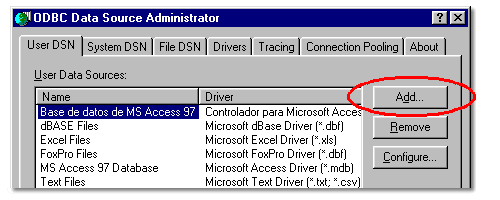
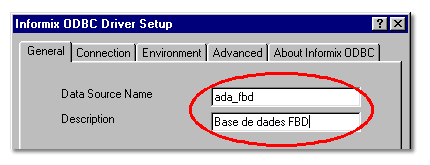
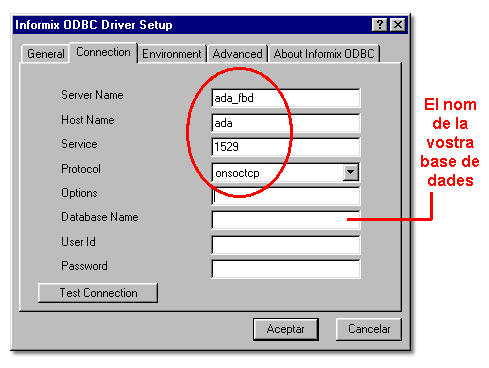
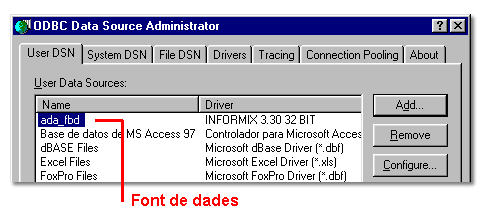
Once you have created a F:\FBD nmake ODBC data source definitionThe first step to be followed when compiling CLI code is to define an ODBC data source through which the connections with the Informix database will be established.
Compile CLI code (Call Level Interface)In order to compile CLI code, you must use a
!include <win32.mak>
# INFORMIXDIR environment variable is not set by the install program.
# You will need to set this to the directory where you have installed
# the INFORMIX-CLI product.
CLI_LIBS  = $(INFORMIXDIR)\lib\iclit09a.lib
CLI_INCL  = $(INFORMIXDIR)\incl\cli
CLI_CFLAGS= /I$(CLI_INCL)
# targets
PROVA     = prova.exe
TARGET    = $(PROVA)
all: $(TARGET)
# Rules
.c.exe:
    $(cc) $(cflags) $(cdebug) $(CLI_CFLAGS) $*.c
    $(link) $(conlflags) $(ldebug) $*.obj $(CLI_LIBS) $(conlibs)
Once you have created a F:\FBD nmake
|  |
|
||||||||
 |
| |
 |
Copyright © Facultat d'Informàtica de Barcelona - webmaster fib.upc.edu fib.upc.edu |