



|
|
|
| |
|
|
||||
 |
| |
| FIB > Computing laboratory > Services > Printing |
Català | Castellano | |
|
|
|
|
|
PrintingLast modified: 14-06-2002
Conditions and timetablesYou can use the printers at the Operations Service in the A5 and C6 Buildings in order to print out your practicals lists (source code and coursework reports). Practical assignment statements, manuals or slides must be sent to the CPET printing service. The staff print out all queued lists once an hour on the hour. The first print-outs come out at 9 a.m., and the last at 8:30 p.m. Given the fact that the volume of print-outs is sometimes very large, jobs sent just before the hour don't necessarily get printed within the current hour. It is very likely that these jobs will remain pending until the next batch of print-outs. PrintersThe various UNIX and PC servers have particular printers assigned. Also, there is a default printer assigned for each system. This means that if no printer is specified, the system redirects the list to the default printer. The following table shows the various queues available for each system:
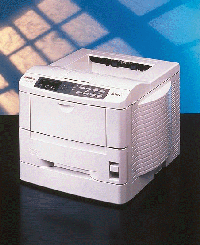
The LCFIB has two Kyocera Ecosys (FS-3700+/FS-3800) laser printers, one for the A5 Building and another for C6. The main characteristic of these printers is that they are ecological, and have very low consumption. Summary of characteristics:
Printing examplesIndependently from the building you are connecting from:
For more information regarding any other printing commands (viewing queues, cancelling printing jobs, etc.), please consult your environment user guide. Printing allowanceThe printing allowance system aims to ensure that users make good use of the printers For this reason, a limit has been put on the number of pages that students are allowed to print per month at the FIB. Point 7 of the rules for use of the computers clearly states what can and cannot be printed. In order to view your current printing allowance, click on the option "printing allowance" in the Student's Corner. This allowance is common to all operating systems. Below is a list of the allowances for each month:
The allowance you can view from the Student's Corner is the sum of everything you have printed, while the maximum allowance per month is indicated in the above table. The leading page before each print job counts as a printed sheet. Bear in mind that the printers do not accept jobs over 30 pages in length or 4MB in size. If you need to print something that exceeds these limits, you will have to split it up. Rules for printingWe would like to remind you once again that you may only print lists that are strictly necessary for carrying out your practicals. Please consult the Computing Laboratory rules in order to find out what you are allowed to print. CPET printing serviceCPET offers you the possibility of using their printers, giving you the best print-out quality for your coursework and practicals. How do I do this? All you have to do is select the appropriate printer (CPET Printer or CPET Color Printer on the PC network) when printing. You will then have to go and collect the print-out at the CPET (production section). Conditions for use of the service:
|  |
|
||||||||||||||||||||||||||||||||||||||||||||
 |
| |
 |
Copyright © Facultat d'Informàtica de Barcelona - webmaster fib.upc.edu fib.upc.edu |
