

|
|
|
| |
|
|
||||
 |
| |
| FIB > Computing laboratory > Services > Using laptop computers in the computer rooms |
Català | Castellano | |
|
|
|
|
|
Using laptop computers in the computer roomsLast modified: 10-06-2002
The LCFIB provides FIB students with a new service that allows them to connect to the FIB network with a laptop computer at some points in the computer rooms. In order to establish this connection, the laptop must have a 10Mbps or 10/100Mbps Ethernet card. This kind of connection offers the following characteristics:
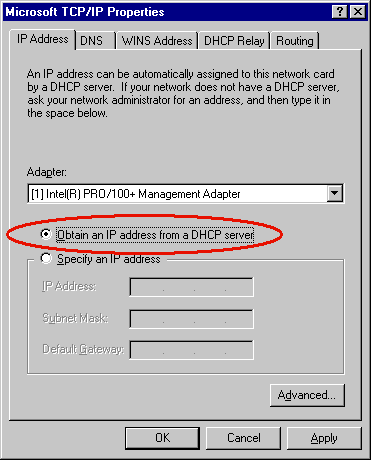
The physical connection of laptops can be made at the available network nodes in classroom C6S304, which will be clearly marked for this new use. DHCP client configurationIn order to boot up dynamically with acces to the network, you will need an adequately installed and configured BOOTP/DHCP client. If you are running Linux (or any other UNIX type system) you may already have a BOOTP/DHCP client. If this is not so, you can find one at the following sites: Here are some useful links for when you are having trouble configuring your DHCP client: If you are running Windows 95/98/2K/NT/ME, all you need to do is specify in the TCP/IP properties that you want to obtain the configuration dynamically:
|  |
|
||||||||||||||||||||
 |
| |
 |
Copyright © Facultat d'Informàtica de Barcelona - webmaster fib.upc.edu fib.upc.edu |
 Internet Software Consortium - DHCP