



|
|
|
| |
|
|
||||
 |
| |
| FIB > Computing laboratory > Services > Wireless > How to gain access to the network |
Català | Castellano | |
|
|
|
|
|
How to gain access to the networkLast update: 19/03/2003
First of all, you must add the following information to the configuration of your card Specific configuration of wireless cards. DHCP configuration (for all cards). To gain access to the network, you must identify yourself as a student or lecturer at the Faculty of Informatics (FIB). To do so, open your browser and access any website.If the following image appears: 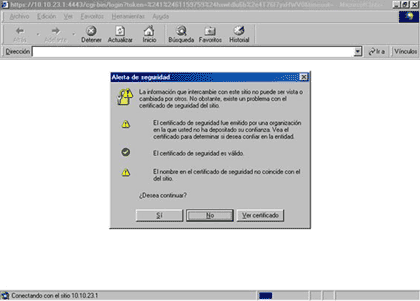 this is because you do not have the UPC's CA (Certification Authority) certificate installed on your laptop. At http://www.fib.upc.es/en/LCFIB/Serveis/Web/certificat.html, you can find all the information you need as to where and how you must install the CA (Certification Authority). Once the certificate has been installed, the message will no longer appear.
The access page will be shown, and you will have to provide your username and password that you use to access "My Space". 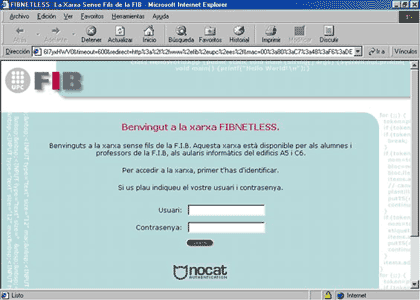 If you have entered these details correctly, the following image will appear. 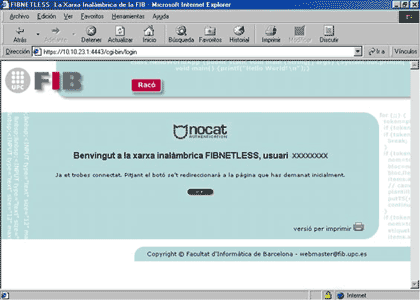 Once the authentication is complete, this will be valid for the amount of time indicated in a window like the one below. 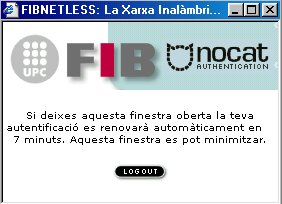 If you do not close this window, the reauthentication process will occur automatically; if not, once the time indicated has elapsed, you will have to request authentication in the manner detailed above. |  |
|
||||||||
 |
| |
 |
Copyright © Facultat d'Informàtica de Barcelona - webmaster fib.upc.edu fib.upc.edu |
